Cross Site Request Forgery (CSRF)
在最终用户可以 log in的应用程序中,重要的是考虑如何防御 Cross Site Request Forgery (CSRF)。 Spring Security 默认情况下会对针对 unsafe HTTP methods的 CSRF 攻击(如 POST 请求)提供保护,因此无需额外的代码。您可以使用以下内容明确指定默认配置:
-
Java
-
Kotlin
-
XML
@Configuration
@EnableWebSecurity
public class SecurityConfig {

	@Bean
	public SecurityFilterChain securityFilterChain(HttpSecurity http) throws Exception {
		http
			// ...
			.csrf(Customizer.withDefaults());
		return http.build();
	}
}
import org.springframework.security.config.annotation.web.invoke
@Configuration
@EnableWebSecurity
class SecurityConfig {
@Bean
open fun securityFilterChain(http: HttpSecurity): SecurityFilterChain {
http {
// ...
csrf { }
}
return http.build()
}
}<http>
<!-- ... -->
<csrf/>
</http>要详细了解应用程序的 CSRF 防御,请考虑以下使用案例:
-
我需要指导如何将 csrf-integration-form,Thymeleaf 与后端集成
-
我需要指导如何将 Angular or another JavaScript framework 与后端集成
-
我需要指导如何将 a mobile application or another client 与后端集成
-
我需要 handling errors 的指导
-
我需要 disabling CSRF protection 的指导
Understanding CSRF Protection’s Components
CSRF 保护由 {security-api-url}org/springframework/security/web/csrf/CsrfFilter.html[CsrfFilter] 中组合的多个组件提供:
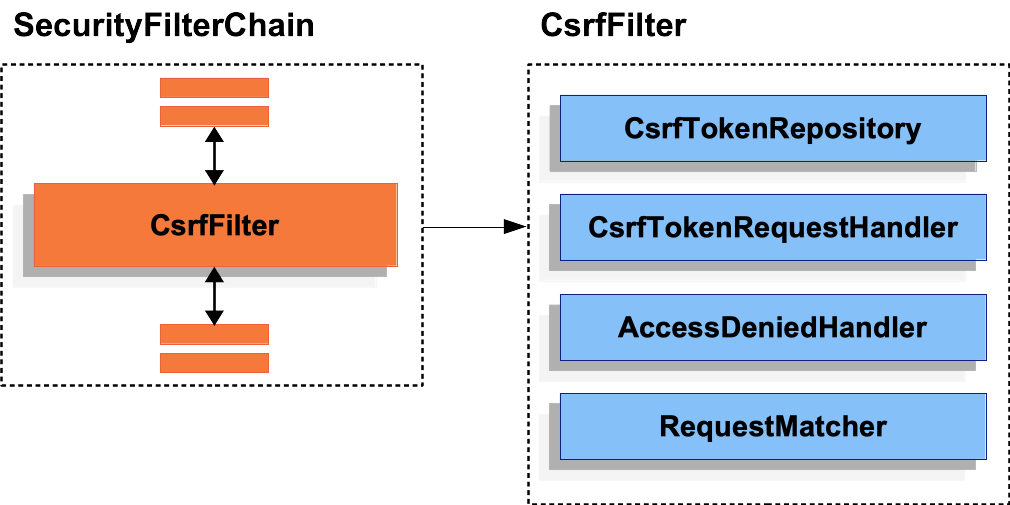
CsrfFilter ComponentsCSRF 防御分为两部分:
-
通过委托到 <<`CsrfTokenRequestHandler`, csrf-token-request-handler>>, 使 {security-api-url}org/springframework/security/web/csrf/CsrfToken.html[
CsrfToken] 可供应用程序使用。 -
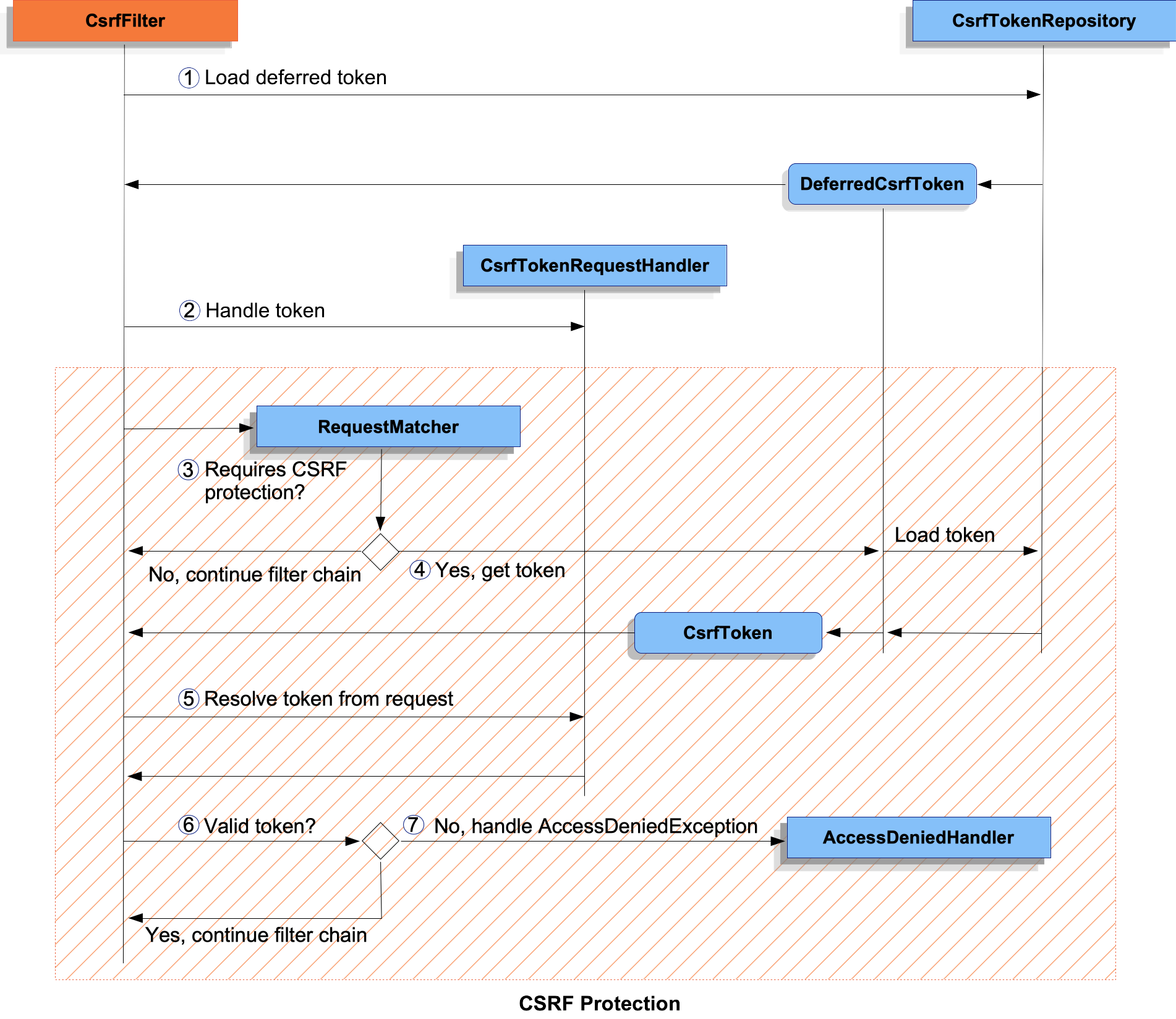
确定请求是否需要 CSRF 保护,加载并验证令牌,以及 handle
AccessDeniedException加载并验证令牌,以及 handleAccessDeniedException。
CsrfFilter Processing-
 首先,加载 {security-api-url}org/springframework/security/web/csrf/DeferredCsrfToken.html[
DeferredCsrfToken], 它保存对 <<`CsrfTokenRepository`,csrf-token-repository>> 的引用,以便 later 可以加载已持久化的CsrfToken(在 中)。
中)。 -
 其次,向 <<`CsrfTokenRequestHandler`,csrf-token-request-handler>> 提供一个
 Supplier<CsrfToken>(从DeferredCsrfToken创建),它负责填充请求属性,让CsrfToken可供应用程序的其余部分使用。 -
 接下来,开始主要的 CSRF 保护处理并检查当前请求是否需要 CSRF 保护。如果不需要,则继续执行过滤器链并结束处理。
 -
如果需要 CSRF 保护,则最终从
DeferredCsrfToken中加载已持久化的CsrfToken。 -
 继续操作,使用 <<`CsrfTokenRequestHandler`,csrf-token-request-handler>> 解析客户端提供的实际 CSRF 令牌(如果存在)。
 -
 将实际 CSRF 令牌与已持久化的
 CsrfToken进行比较。如果有效,则继续执行过滤器链并结束处理。 -
 如果实际 CSRF 令牌无效(或缺失),则将
 AccessDeniedException传递给 <<`AccessDeniedHandler`,csrf-access-denied-handler>> 并且处理结束。
Migrating to Spring Security 6
从 Spring Security 5 迁移到 6 时,有一些更改可能会影响您的应用程序。以下是针对 Spring Security 6 中更改的 CSRF 保护方面的概述:
-
CsrfToken的加载现在是 deferred by default 的,以提高性能,不再需要在每个请求上加载会话。 -
CsrfToken现在包含 randomness on every request by default 以保护 CSRF 令牌,免受 BREACH 攻击。
|
Spring Security 6 中的更改需要对单页应用程序进行额外的配置,因此您可能觉得 Single-Page Applications 一节特别有用。 |
有关迁移 Spring Security 5 应用程序的更多信息,请参阅 Migration 一章的 Exploit Protection 部分。
Persisting the CsrfToken
CsrfToken 使用 CsrfTokenRepository 进行持久化。
默认情况下,<<`HttpSessionCsrfTokenRepository`,csrf-token-repository-httpsession>> 用于将标记存储在会话中。Spring Security 还提供 <<`CookieCsrfTokenRepository`,csrf-token-repository-cookie>> 用于将标记存储在 Cookie 中。您还可以指定 your own implementation 以便根据需要随时存储标记。
Using the HttpSessionCsrfTokenRepository
默认情况下,Spring Security 使用 {security-api-url}org/springframework/security/web/csrf/HttpSessionCsrfTokenRepository.html[HttpSessionCsrfTokenRepository] 将预期的 CSRF 令牌存储在 HttpSession 中,因此无需其他代码。
HttpSessionCsrfTokenRepository 默认情况下从名为 X-CSRF-TOKEN 的 HTTP 请求标头或请求参数 _csrf 读入标记。
您可以使用以下配置明确指定默认配置:
HttpSessionCsrfTokenRepository-
Java
-
Kotlin
-
XML
@Configuration
@EnableWebSecurity
public class SecurityConfig {

	@Bean
	public SecurityFilterChain securityFilterChain(HttpSecurity http) throws Exception {
		http
			// ...
			.csrf((csrf) -> csrf
				.csrfTokenRepository(new HttpSessionCsrfTokenRepository())
			);
		return http.build();
	}
}
import org.springframework.security.config.annotation.web.invoke
@Configuration
@EnableWebSecurity
class SecurityConfig {
@Bean
open fun securityFilterChain(http: HttpSecurity): SecurityFilterChain {
http {
// ...
csrf {
csrfTokenRepository = HttpSessionCsrfTokenRepository()
}
}
return http.build()
}
}<http>
<!-- ... -->
<csrf token-repository-ref="tokenRepository"/>
</http>
<b:bean id="tokenRepository"
class="org.springframework.security.web.csrf.HttpSessionCsrfTokenRepository"/>Using the CookieCsrfTokenRepository
您可以使用 {security-api-url}org/springframework/security/web/csrf/CookieCsrfTokenRepository.html[CookieCsrfTokenRepository] 将 CsrfToken 保存在 cookie 中以 support a JavaScript-based application。
CookieCsrfTokenRepository 默认情况下会写入一个名为 XSRF-TOKEN 的 cookie,并从一个名为 X-XSRF-TOKEN 的 HTTP 请求头或一个请求参数 _csrf 中读取它。这些默认值来自 Angular 及其前身 AngularJS。
|
有关此主题的最新信息,请参阅 Cross-Site Request Forgery (XSRF) protection 指南和 HttpClientXsrfModule。 |
您可以使用以下配置来配置 CookieCsrfTokenRepository :
CookieCsrfTokenRepository-
Java
-
Kotlin
-
XML
@Configuration
@EnableWebSecurity
public class SecurityConfig {

	@Bean
	public SecurityFilterChain securityFilterChain(HttpSecurity http) throws Exception {
		http
			// ...
			.csrf((csrf) -> csrf
				.csrfTokenRepository(CookieCsrfTokenRepository.withHttpOnlyFalse())
			);
		return http.build();
	}
}
import org.springframework.security.config.annotation.web.invoke
@Configuration
@EnableWebSecurity
class SecurityConfig {
@Bean
open fun securityFilterChain(http: HttpSecurity): SecurityFilterChain {
http {
// ...
csrf {
csrfTokenRepository = CookieCsrfTokenRepository.withHttpOnlyFalse()
}
}
return http.build()
}
}<http>
<!-- ... -->
<csrf token-repository-ref="tokenRepository"/>
</http>
<b:bean id="tokenRepository"
class="org.springframework.security.web.csrf.CookieCsrfTokenRepository"
p:cookieHttpOnly="false"/>|
该示例明确将 |
Customizing the CsrfTokenRepository
在某些情况下,您可能需要实现一个自定义 {security-api-url}org/springframework/security/web/csrf/CsrfTokenRepository.html[CsrfTokenRepository]。
一旦实现了 CsrfTokenRepository 接口,您可以将 Spring Security 配置为使用以下配置:
CsrfTokenRepository-
Java
-
Kotlin
-
XML
@Configuration
@EnableWebSecurity
public class SecurityConfig {

	@Bean
	public SecurityFilterChain securityFilterChain(HttpSecurity http) throws Exception {
		http
			// ...
			.csrf((csrf) -> csrf
				.csrfTokenRepository(new CustomCsrfTokenRepository())
			);
		return http.build();
	}
}
import org.springframework.security.config.annotation.web.invoke
@Configuration
@EnableWebSecurity
class SecurityConfig {
@Bean
open fun securityFilterChain(http: HttpSecurity): SecurityFilterChain {
http {
// ...
csrf {
csrfTokenRepository = CustomCsrfTokenRepository()
}
}
return http.build()
}
}<http>
<!-- ... -->
<csrf token-repository-ref="tokenRepository"/>
</http>
<b:bean id="tokenRepository"
class="example.CustomCsrfTokenRepository"/>Handling the CsrfToken
CsrfToken 通过 CsrfTokenRequestHandler 提供给应用程序。此组件还负责从 HTTP 标头或请求参数中解析 CsrfToken。
默认情况下,<<`XorCsrfTokenRequestAttributeHandler`,csrf-token-request-handler-breach>> 用于提供 CsrfToken 的 BREACH 保护。Spring Security 还提供了 csrf-token-request-handler-plain 来选择退出 BREACH 保护。您还可以指定 your own implementation 来自定义处理和解析令牌的策略。
Using the XorCsrfTokenRequestAttributeHandler (BREACH)
XorCsrfTokenRequestAttributeHandler 使 CsrfToken 可用,作为一个名为 _csrf 的 HttpServletRequest 属性,并为 BREACH 提供保护。
|
|
此实现还将标记值从请求中解析为请求标头(默认情况下为 <<`X-CSRF-TOKEN`, csrf-token-repository-httpsession>> 或 <<`X-XSRF-TOKEN`, csrf-token-repository-cookie>>)或请求参数(默认情况下为 _csrf)。
|
BREACH 保护通过将随机性编码到 CSRF 令牌值中来确保返回的 |
默认情况下,Spring Security 会保护 CSRF 令牌免受 BREACH 攻击,因此无需其他代码。您可以使用以下配置明确指定默认配置:
-
Java
-
Kotlin
-
XML
@Configuration
@EnableWebSecurity
public class SecurityConfig {

	@Bean
	public SecurityFilterChain securityFilterChain(HttpSecurity http) throws Exception {
		http
			// ...
			.csrf((csrf) -> csrf
				.csrfTokenRequestHandler(new XorCsrfTokenRequestAttributeHandler())
			);
		return http.build();
	}
}
import org.springframework.security.config.annotation.web.invoke
@Configuration
@EnableWebSecurity
class SecurityConfig {
@Bean
open fun securityFilterChain(http: HttpSecurity): SecurityFilterChain {
http {
// ...
csrf {
csrfTokenRequestHandler = XorCsrfTokenRequestAttributeHandler()
}
}
return http.build()
}
}<http>
<!-- ... -->
<csrf request-handler-ref="requestHandler"/>
</http>
<b:bean id="requestHandler"
class="org.springframework.security.web.csrf.XorCsrfTokenRequestAttributeHandler"/>Using the CsrfTokenRequestAttributeHandler
CsrfTokenRequestAttributeHandler 使 CsrfToken 作为名为 _csrf 的 HttpServletRequest 属性提供。
|
|
此实现还将标记值从请求中解析为请求标头(默认情况下为 <<`X-CSRF-TOKEN`, csrf-token-repository-httpsession>> 或 <<`X-XSRF-TOKEN`, csrf-token-repository-cookie>>)或请求参数(默认情况下为 _csrf)。
CsrfTokenRequestAttributeHandler 的主要用途是退出 CsrfToken 的 BREACH 保护,可以使用以下配置进行配置:
-
Java
-
Kotlin
-
XML
@Configuration
@EnableWebSecurity
public class SecurityConfig {

	@Bean
	public SecurityFilterChain securityFilterChain(HttpSecurity http) throws Exception {
		http
			// ...
			.csrf((csrf) -> csrf
				.csrfTokenRequestHandler(new CsrfTokenRequestAttributeHandler())
			);
		return http.build();
	}
}
import org.springframework.security.config.annotation.web.invoke
@Configuration
@EnableWebSecurity
class SecurityConfig {
@Bean
open fun securityFilterChain(http: HttpSecurity): SecurityFilterChain {
http {
// ...
csrf {
csrfTokenRequestHandler = CsrfTokenRequestAttributeHandler()
}
}
return http.build()
}
}<http>
<!-- ... -->
<csrf request-handler-ref="requestHandler"/>
</http>
<b:bean id="requestHandler"
class="org.springframework.security.web.csrf.CsrfTokenRequestAttributeHandler"/>Customizing the CsrfTokenRequestHandler
您可以实现 CsrfTokenRequestHandler 接口以自定义处理和解析令牌的策略。
|
|
一旦实现了 CsrfTokenRequestHandler 接口,您可以将 Spring Security 配置为使用以下配置:
CsrfTokenRequestHandler-
Java
-
Kotlin
-
XML
@Configuration
@EnableWebSecurity
public class SecurityConfig {

	@Bean
	public SecurityFilterChain securityFilterChain(HttpSecurity http) throws Exception {
		http
			// ...
			.csrf((csrf) -> csrf
				.csrfTokenRequestHandler(new CustomCsrfTokenRequestHandler())
			);
		return http.build();
	}
}
import org.springframework.security.config.annotation.web.invoke
@Configuration
@EnableWebSecurity
class SecurityConfig {
@Bean
open fun securityFilterChain(http: HttpSecurity): SecurityFilterChain {
http {
// ...
csrf {
csrfTokenRequestHandler = CustomCsrfTokenRequestHandler()
}
}
return http.build()
}
}<http>
<!-- ... -->
<csrf request-handler-ref="requestHandler"/>
</http>
<b:bean id="requestHandler"
class="example.CustomCsrfTokenRequestHandler"/>Deferred Loading of the CsrfToken
默认情况下,Spring Security 会延迟加载 CsrfToken,直至需要为止。
|
无论何时通过 unsafe HTTP method(如 POST)进行请求,都需要 |
由于 Spring Security 默认情况下还将 CsrfToken 存储在 HttpSession 中,因此延迟 CSRF 令牌可以通过不需要在每个请求中加载会话来提高性能。
如果您希望选择退出延迟令牌并导致 CsrfToken 在每个请求中加载,可以使用以下配置:
-
Java
-
Kotlin
-
XML
@Configuration
@EnableWebSecurity
public class SecurityConfig {

	@Bean
	public SecurityFilterChain securityFilterChain(HttpSecurity http) throws Exception {
		XorCsrfTokenRequestAttributeHandler requestHandler = new XorCsrfTokenRequestAttributeHandler();
		// set the name of the attribute the CsrfToken will be populated on
		requestHandler.setCsrfRequestAttributeName(null);
		http
			// ...
			.csrf((csrf) -> csrf
				.csrfTokenRequestHandler(requestHandler)
			);
		return http.build();
	}
}
import org.springframework.security.config.annotation.web.invoke
@Configuration
@EnableWebSecurity
class SecurityConfig {
@Bean
open fun securityFilterChain(http: HttpSecurity): SecurityFilterChain {
val requestHandler = XorCsrfTokenRequestAttributeHandler()
// set the name of the attribute the CsrfToken will be populated on
requestHandler.setCsrfRequestAttributeName(null)
http {
// ...
csrf {
csrfTokenRequestHandler = requestHandler
}
}
return http.build()
}
}<http>
<!-- ... -->
<csrf request-handler-ref="requestHandler"/>
</http>
<b:bean id="requestHandler"
class="org.springframework.security.web.csrf.CsrfTokenRequestAttributeHandler">
<b:property name="csrfRequestAttributeName">
<b:null/>
</b:property>
</b:bean>|
通过将 |
Integrating with CSRF Protection
为了使 synchronizer token pattern免受 CSRF 攻击,我们必须在 HTTP 请求中包含实际的 CSRF 令牌。这必须包含在请求的一部分(表单参数、HTTP 头或其他部分)中,浏览器不会自动将它包含在 HTTP 请求中。
下列部分描述了前端或客户端应用程序可以与受 CSRF 保护的后端应用程序集成的各种方式:
HTML Forms
要提交 HTML 表单,CSRF 令牌必须作为隐藏输入包含在表单中。例如,呈现的 HTML 可能如下所示:
<input type="hidden"
	name="_csrf"
	value="4bfd1575-3ad1-4d21-96c7-4ef2d9f86721"/>
以下视图技术会自动在具有不安全 HTTP 方法(例如 POST)的表单中包含实际的 CSRF 令牌:
-
任何与 {spring-framework-api-url}org/springframework/web/servlet/support/RequestDataValueProcessor.html[
RequestDataValueProcessor] 集成的其他视图技术(通过 {security-api-url}org/springframework/security/web/servlet/support/csrf/CsrfRequestDataValueProcessor.html[CsrfRequestDataValueProcessor]) -
您还可以通过 csrfInput 标记自己包含令牌
如果这些选项不可用,您可以利用以下事实:SecurityContextHolder 作为名为 csrf-token-request-handler 的 HttpServletRequest 属性公开。以下示例通过 JSP 这样做:
<c:url var="logoutUrl" value="/logout"/>
<form action="${logoutUrl}"
	method="post">
<input type="submit"
	value="Log out" />
<input type="hidden"
	name="${_csrf.parameterName}"
	value="${_csrf.token}"/>
</form>
JavaScript Applications
JavaScript 应用程序通常使用 JSON 而不是 HTML。如果您使用 JSON,您可以通过 HTTP 请求头(而不是请求参数)提交 CSRF 令牌。
为了获得 CSRF 令牌,您可以配置 Spring Security 来存储预期的 CSRF 令牌。通过将预期令牌存储在 cookie 中,JavaScript 框架(例如 jQuery)可以自动将实际 CSRF 令牌作为 HTTP 请求头包含进来。
|
当将单页面应用程序 (SPA) 与 Spring Security 的 CSRF 保护集成时,需要特别考虑 BREACH 保护和延迟令牌。在中提供了完整的配置示例。 |
您可以在以下部分中了解不同类型的 JavaScript 应用程序:
Single-Page Applications
将单页面应用程序 (SPA) 与 Spring Security 的 CSRF 保护集成时需要特别考虑。
请记住,Spring Security 默认提供 CSRF 保护。当存储预期的 CSRF 令牌时,JavaScript 应用程序只能访问纯令牌值,而不能访问编码值。需要提供一个解析实际令牌值的解析器。
此外,存储 CSRF 令牌的 cookie 将在身份验证成功和注销成功后被清除。Spring Security 默认延迟加载新的 CSRF 令牌,并且需要额外的操作来返回一个新的 cookie。
|
在身份验证成功和注销成功后刷新令牌是必需的,因为 |
为了轻松地将单页面应用程序与 Spring Security 集成,可以使用以下配置:
-
Java
-
Kotlin
-
XML
@Configuration
@EnableWebSecurity
public class SecurityConfig {

	@Bean
	public SecurityFilterChain securityFilterChain(HttpSecurity http) throws Exception {
		http
			// ...
			.csrf((csrf) -> csrf
				.csrfTokenRepository(CookieCsrfTokenRepository.withHttpOnlyFalse())   (1)
				.csrfTokenRequestHandler(new SpaCsrfTokenRequestHandler())            (2)
			)
			.addFilterAfter(new CsrfCookieFilter(), BasicAuthenticationFilter.class); (3)
		return http.build();
	}
}

final class SpaCsrfTokenRequestHandler extends CsrfTokenRequestAttributeHandler {
	private final CsrfTokenRequestHandler delegate = new XorCsrfTokenRequestAttributeHandler();

	@Override
	public void handle(HttpServletRequest request, HttpServletResponse response, Supplier<CsrfToken> csrfToken) {
		/*
		 * Always use XorCsrfTokenRequestAttributeHandler to provide BREACH protection of
		 * the CsrfToken when it is rendered in the response body.
		 */
		this.delegate.handle(request, response, csrfToken);
	}

	@Override
	public String resolveCsrfTokenValue(HttpServletRequest request, CsrfToken csrfToken) {
		/*
		 * If the request contains a request header, use CsrfTokenRequestAttributeHandler
		 * to resolve the CsrfToken. This applies when a single-page application includes
		 * the header value automatically, which was obtained via a cookie containing the
		 * raw CsrfToken.
		 */
		if (StringUtils.hasText(request.getHeader(csrfToken.getHeaderName()))) {
			return super.resolveCsrfTokenValue(request, csrfToken);
		}
		/*
		 * In all other cases (e.g. if the request contains a request parameter), use
		 * XorCsrfTokenRequestAttributeHandler to resolve the CsrfToken. This applies
		 * when a server-side rendered form includes the _csrf request parameter as a
		 * hidden input.
		 */
		return this.delegate.resolveCsrfTokenValue(request, csrfToken);
	}
}

final class CsrfCookieFilter extends OncePerRequestFilter {

	@Override
	protected void doFilterInternal(HttpServletRequest request, HttpServletResponse response, FilterChain filterChain)
			throws ServletException, IOException {
		CsrfToken csrfToken = (CsrfToken) request.getAttribute("_csrf");
		// Render the token value to a cookie by causing the deferred token to be loaded
		csrfToken.getToken();

		filterChain.doFilter(request, response);
	}
}
import org.springframework.security.config.annotation.web.invoke
@Configuration
@EnableWebSecurity
class SecurityConfig {
@Bean
open fun securityFilterChain(http: HttpSecurity): SecurityFilterChain {
http {
// ...
csrf {
csrfTokenRepository = CookieCsrfTokenRepository.withHttpOnlyFalse() (1)
csrfTokenRequestHandler = SpaCsrfTokenRequestHandler() (2)
}
}
http.addFilterAfter(CsrfCookieFilter(), BasicAuthenticationFilter::class.java) (3)
return http.build()
}
}
class SpaCsrfTokenRequestHandler : CsrfTokenRequestAttributeHandler() {
private val delegate: CsrfTokenRequestHandler = XorCsrfTokenRequestAttributeHandler()
override fun handle(request: HttpServletRequest, response: HttpServletResponse, csrfToken: Supplier<CsrfToken>) {
/*
* Always use XorCsrfTokenRequestAttributeHandler to provide BREACH protection of
* the CsrfToken when it is rendered in the response body.
*/
delegate.handle(request, response, csrfToken)
}
override fun resolveCsrfTokenValue(request: HttpServletRequest, csrfToken: CsrfToken): String {
/*
* If the request contains a request header, use CsrfTokenRequestAttributeHandler
* to resolve the CsrfToken. This applies when a single-page application includes
* the header value automatically, which was obtained via a cookie containing the
* raw CsrfToken.
*/
return if (StringUtils.hasText(request.getHeader(csrfToken.headerName))) {
super.resolveCsrfTokenValue(request, csrfToken)
} else {
/*
* In all other cases (e.g. if the request contains a request parameter), use
* XorCsrfTokenRequestAttributeHandler to resolve the CsrfToken. This applies
* when a server-side rendered form includes the _csrf request parameter as a
* hidden input.
*/
delegate.resolveCsrfTokenValue(request, csrfToken)
}
}
}
class CsrfCookieFilter : OncePerRequestFilter() {
@Throws(ServletException::class, IOException::class)
override fun doFilterInternal(request: HttpServletRequest, response: HttpServletResponse, filterChain: FilterChain) {
val csrfToken = request.getAttribute("_csrf") as CsrfToken
// Render the token value to a cookie by causing the deferred token to be loaded
csrfToken.token
filterChain.doFilter(request, response)
}
}<http>
<!-- ... -->
<csrf
token-repository-ref="tokenRepository" 1
request-handler-ref="requestHandler"/> 2
<custom-filter ref="csrfCookieFilter" after="BASIC_AUTH_FILTER"/> 3
</http>
<b:bean id="tokenRepository"
class="org.springframework.security.web.csrf.CookieCsrfTokenRepository"
p:cookieHttpOnly="false"/>
<b:bean id="requestHandler"
class="example.SpaCsrfTokenRequestHandler"/>
<b:bean id="csrfCookieFilter"
class="example.CsrfCookieFilter"/><1> 使用将 `HttpOnly` 设置为 `false` 来配置 `CookieCsrfTokenRepository`,以便 cookie 可以被 JavaScript 应用程序读取。 <1> 配置一个自定义 `CsrfTokenRequestHandler`,它根据是否为 HTTP 请求标头 (`X-XSRF-TOKEN`) 或请求参数 (`_csrf`) 来解析 CSRF 令牌。 <1> 配置一个自定义 `Filter` 来在每个请求上加载 `CsrfToken`,如果需要,它将返回一个新 cookie。
Multi-Page Applications
对于在每个页面加载 JavaScript 的多页面应用程序,除了公开 CSRF 令牌之外的另一种选择是在 meta 标签中包含 CSRF 令牌。HTML 可能如下所示:
<html>
<head>
	<meta name="_csrf" content="4bfd1575-3ad1-4d21-96c7-4ef2d9f86721"/>
	<meta name="_csrf_header" content="X-CSRF-TOKEN"/>
	<!-- ... -->
</head>
<!-- ... -->
</html>
为了在请求中包含 CSRF 令牌,您可以利用以下事实:SecurityContextHolder 作为名为 csrf-token-request-handler 的 HttpServletRequest 属性公开。以下示例通过 JSP 这样做:
<html>
<head>
	<meta name="_csrf" content="${_csrf.token}"/>
	<!-- default header name is X-CSRF-TOKEN -->
	<meta name="_csrf_header" content="${_csrf.headerName}"/>
	<!-- ... -->
</head>
<!-- ... -->
</html>
一旦元标记包含了 CSRF 令牌,JavaScript 代码就可以读取元标记并将 CSRF 令牌作为一个标头包含进来。如果您使用 jQuery,您可以使用以下代码这样做:
$(function () {
	var token = $("meta[name='_csrf']").attr("content");
	var header = $("meta[name='_csrf_header']").attr("content");
	$(document).ajaxSend(function(e, xhr, options) {
		xhr.setRequestHeader(header, token);
	});
});
Other JavaScript Applications
JavaScript 应用程序的另一个选项是将 CSRF 令牌包含在 HTTP 响应头中。
实现此目的的一种方法是使用带有 CsrfTokenArgumentResolver的 @ControllerAdvice。以下是适用于应用程序中所有控制器端点的 `@ControllerAdvice`示例:
-
Java
-
Kotlin
@ControllerAdvice
public class CsrfControllerAdvice {

	@ModelAttribute
	public void getCsrfToken(HttpServletResponse response, CsrfToken csrfToken) {
		response.setHeader(csrfToken.getHeaderName(), csrfToken.getToken());
	}

}
@ControllerAdvice
class CsrfControllerAdvice {
@ModelAttribute
fun getCsrfToken(response: HttpServletResponse, csrfToken: CsrfToken) {
response.setHeader(csrfToken.headerName, csrfToken.token)
}
}|
因为这个注释适用于应用程序中的所有端点,所以它将导致在每个请求中加载 CSRF 令牌,而当使用 |
|
请记住,控制器端点和控制器建议在 Spring 安全过滤器链中称为 after。这意味着该 |
CSR 令牌现在将可在对任何自定义端点的控制器建议适用的响应头中获取(<<`X-CSRF-TOKEN`,csrf-token-repository-httpsession>> 或 <<`X-XSRF-TOKEN`,csrf-token-repository-cookie>>,默认为)。可使用对后端的任何请求从响应中获取令牌,而后续请求可将令牌包含在名称相同的请求头中。
Mobile Applications
与 JavaScript applications 一样,移动应用程序通常使用 JSON,而不是 HTML。一个 does not 服务浏览器流量的后端应用程序可能会选择 disable CSRF。在这种情况下,不需要任何其他工作。
但是,一个既服务浏览器流量又因此 still requires CSR 保护的后端应用程序可能仍继续存储 CsrfToken in the session,而不是 in a cookie。
在这种情况下,与后端集成的典型模式是公开一个 /csrf 端点,供前端(移动或浏览器客户端)按需请求 CSR 令牌。使用此模式的好处是,CSR 令牌 can continue to be deferred 仅在请求需要 CSR 保护时才需要从会话中加载。使用自定义端点还意味着客户端应用程序可以通过发出明确的请求按需请求生成新令牌(如果需要)。
|
此模式可用于需要 CSR 保护的任何类型应用程序,而不仅仅是移动应用程序。虽然在这些情况下通常不需要这种方法,但它是与 CSR 受到保护的后端集成的另一种选择。 |
以下是使用 CsrfTokenArgumentResolver的 `/csrf`端点的示例:
/csrf endpoint-
Java
-
Kotlin
@RestController
public class CsrfController {

    @GetMapping("/csrf")
    public CsrfToken csrf(CsrfToken csrfToken) {
        return csrfToken;
    }

}
@RestController
class CsrfController {
@GetMapping("/csrf")
fun csrf(csrfToken: CsrfToken): CsrfToken {
return csrfToken
}
}|
如果在向服务器进行身份验证之前需要上述端点,你可以考虑添加 |
该端点应在应用程序启动或初始化(例如,在加载时)时调用以获取 CSR 令牌,还应在身份验证成功和注销成功后调用。
|
在身份验证成功和注销成功后刷新令牌是必需的,因为 |
一旦你获取了 CSR 令牌,你需要将其自身作为 HTTP 请求头(默认为 <<`X-CSRF-TOKEN`,csrf-token-repository-httpsession>> 或 <<`X-XSRF-TOKEN`,csrf-token-repository-cookie>> 之一)包含在内。
Handle AccessDeniedException
为了处理诸如 InvalidCsrfTokenException 之类的 AccessDeniedException,你可以配置 Spring Security 以任意方式处理这些异常。例如,你可以使用以下配置来配置自定义的拒绝访问页面:
AccessDeniedHandler-
Java
-
Kotlin
-
XML
@Configuration
@EnableWebSecurity
public class SecurityConfig {

	@Bean
	public SecurityFilterChain securityFilterChain(HttpSecurity http) throws Exception {
		http
			// ...
			.exceptionHandling((exceptionHandling) -> exceptionHandling
				.accessDeniedPage("/access-denied")
			);
		return http.build();
	}
}
import org.springframework.security.config.annotation.web.invoke
@Configuration
@EnableWebSecurity
class SecurityConfig {
@Bean
open fun securityFilterChain(http: HttpSecurity): SecurityFilterChain {
http {
// ...
exceptionHandling {
accessDeniedPage = "/access-denied"
}
}
return http.build()
}
}<http>
<!-- ... -->
<access-denied-handler error-page="/access-denied"/>
</http>CSRF Testing
您可以使用 Spring Security 的 testing support 和 CsrfRequestPostProcessor 来测试 CSRF 保护,如下所示:
-
Java
-
Kotlin
import static org.springframework.security.test.web.servlet.request.SecurityMockMvcRequestPostProcessors.*;
import static org.springframework.security.test.web.servlet.setup.SecurityMockMvcConfigurers.*;
import static org.springframework.test.web.servlet.request.MockMvcRequestBuilders.*;
import static org.springframework.test.web.servlet.result.MockMvcResultMatchers.*;

@ExtendWith(SpringExtension.class)
@ContextConfiguration(classes = SecurityConfig.class)
@WebAppConfiguration
public class CsrfTests {

	private MockMvc mockMvc;

	@BeforeEach
	public void setUp(WebApplicationContext applicationContext) {
		this.mockMvc = MockMvcBuilders.webAppContextSetup(applicationContext)
			.apply(springSecurity())
			.build();
	}

	@Test
	public void loginWhenValidCsrfTokenThenSuccess() throws Exception {
		this.mockMvc.perform(post("/login").with(csrf())
				.accept(MediaType.TEXT_HTML)
				.param("username", "user")
				.param("password", "password"))
			.andExpect(status().is3xxRedirection())
			.andExpect(header().string(HttpHeaders.LOCATION, "/"));
	}

	@Test
	@WithMockUser
	public void logoutWhenValidCsrfTokenThenSuccess() throws Exception {
		this.mockMvc.perform(post("/logout").with(csrf())
				.accept(MediaType.TEXT_HTML))
			.andExpect(status().is3xxRedirection())
			.andExpect(header().string(HttpHeaders.LOCATION, "/login?logout"));
	}
}
import org.springframework.security.test.web.servlet.request.SecurityMockMvcRequestPostProcessors.*
import org.springframework.security.test.web.servlet.setup.SecurityMockMvcConfigurers.*
import org.springframework.test.web.servlet.request.MockMvcRequestBuilders.*
import org.springframework.test.web.servlet.result.MockMvcResultMatchers.*
@ExtendWith(SpringExtension::class)
@ContextConfiguration(classes = [SecurityConfig::class])
@WebAppConfiguration
class CsrfTests {
private lateinit var mockMvc: MockMvc
@BeforeEach
fun setUp(applicationContext: WebApplicationContext) {
mockMvc = MockMvcBuilders.webAppContextSetup(applicationContext)
.apply<DefaultMockMvcBuilder>(springSecurity())
.build()
}
@Test
fun loginWhenValidCsrfTokenThenSuccess() {
mockMvc.perform(post("/login").with(csrf())
.accept(MediaType.TEXT_HTML)
.param("username", "user")
.param("password", "password"))
.andExpect(status().is3xxRedirection)
.andExpect(header().string(HttpHeaders.LOCATION, "/"))
}
@Test
@WithMockUser
@Throws(Exception::class)
fun logoutWhenValidCsrfTokenThenSuccess() {
mockMvc.perform(post("/logout").with(csrf())
.accept(MediaType.TEXT_HTML))
.andExpect(status().is3xxRedirection)
.andExpect(header().string(HttpHeaders.LOCATION, "/login?logout"))
}
}Disable CSRF Protection
默认情况下,启用 CSRF 保护,这会影响应用程序的 integrating with the backend和 testing。在禁用 CSRF 保护之前,请考虑是否 makes sense for your application。
你还可以考虑是否只有某些端点不需要 CSR 保护并配置一个忽略规则,如下图例所示:
-
Java
-
Kotlin
-
XML
@Configuration
@EnableWebSecurity
public class SecurityConfig {

    @Bean
    public SecurityFilterChain securityFilterChain(HttpSecurity http) throws Exception {
        http
            // ...
            .csrf((csrf) -> csrf
                .ignoringRequestMatchers("/api/*")
            );
        return http.build();
    }
}
import org.springframework.security.config.annotation.web.invoke
@Configuration
@EnableWebSecurity
class SecurityConfig {
@Bean
open fun securityFilterChain(http: HttpSecurity): SecurityFilterChain {
http {
// ...
csrf {
ignoringRequestMatchers("/api/*")
}
}
return http.build()
}
}<http>
<!-- ... -->
<csrf request-matcher-ref="csrfMatcher"/>
</http>
<b:bean id="csrfMatcher"
class="org.springframework.security.web.util.matcher.AndRequestMatcher">
<b:constructor-arg value="#{T(org.springframework.security.web.csrf.CsrfFilter).DEFAULT_CSRF_MATCHER}"/>
<b:constructor-arg>
<b:bean class="org.springframework.security.web.util.matcher.NegatedRequestMatcher">
<b:bean class="org.springframework.security.web.util.matcher.AntPathRequestMatcher">
<b:constructor-arg value="/api/*"/>
</b:bean>
</b:bean>
</b:constructor-arg>
</b:bean>如果你需要禁用 CSR 保护,你可以使用以下配置进行禁用:
-
Java
-
Kotlin
-
XML
@Configuration
@EnableWebSecurity
public class SecurityConfig {

	@Bean
	public SecurityFilterChain securityFilterChain(HttpSecurity http) throws Exception {
		http
			// ...
			.csrf((csrf) -> csrf.disable());
		return http.build();
	}
}
import org.springframework.security.config.annotation.web.invoke
@Configuration
@EnableWebSecurity
class SecurityConfig {
@Bean
open fun securityFilterChain(http: HttpSecurity): SecurityFilterChain {
http {
// ...
csrf {
disable()
}
}
return http.build()
}
}<http>
<!-- ... -->
<csrf disabled="true"/>
</http>CSRF Considerations
在实现针对 CSRF 攻击的保护时,有一些特殊注意事项。本节讨论了这些注意事项,因为它们与 servlet 环境有关。有关更一般的讨论,请参阅 CSRF Considerations。
Logging In
require CSRF for log in请求对于保护伪造登录尝试非常重要。Spring Security 对 servlet 的支持开箱即用地实现了这一点。
Logging Out
require CSRF for log out请求对于防御伪造注销尝试非常重要。如果启用 CSRF 保护(默认),Spring Security 的 `LogoutFilter`将只处理 HTTP POST 请求。这可确保注销需要 CSRF 令牌,并且恶意用户无法强制注销您的用户。
最简单的方法是使用表单来注销用户。如果你真的想要一个链接,你可以使用 JavaScript 使链接执行 POST(可能在隐藏的表单上)。对于禁用 JavaScrip 的浏览器,你可以选择让链接将用户带到执行 POST 的注销确认页面。
如果你真的想使用 HTTP GET 注销,你可以这么做。但是,请记住,通常不建议这样做。例如,以下内容会在使用任何 HTTP 方法请求 /logout URL 时注销:
-
Java
-
Kotlin
@Configuration
@EnableWebSecurity
public class SecurityConfig {

	@Bean
	public SecurityFilterChain securityFilterChain(HttpSecurity http) throws Exception {
		http
			// ...
			.logout((logout) -> logout
				.logoutRequestMatcher(new AntPathRequestMatcher("/logout"))
			);
		return http.build();
	}
}
import org.springframework.security.config.annotation.web.invoke
@Configuration
@EnableWebSecurity
class SecurityConfig {
@Bean
open fun securityFilterChain(http: HttpSecurity): SecurityFilterChain {
http {
// ...
logout {
logoutRequestMatcher = AntPathRequestMatcher("/logout")
}
}
return http.build()
}
}有关更多信息,请参阅Logout章节。
CSRF and Session Timeouts
默认情况下,Spring Security 将 CSRF 令牌存储在`HttpSession`中,使用<<`HttpSessionCsrfTokenRepository`,csrf-token-repository-httpsession>>。这会导致这样一个情况:会话过期,没有 CSRF 令牌进行验证。
我们在 general solutions 讨论了会话超时。该部分讨论了 CSRF 超时的具体内容,因为它与服务支持有关。
你可以将 CSRF 令牌存储更改为 cookie 中。有关详细信息,请参阅Using the CookieCsrfTokenRepository一节。
如果令牌确实过期,你可能希望通过指定一个custom AccessDeniedHandler来自定义处理方式。自定义`AccessDeniedHandler`可以任意处理`InvalidCsrfTokenException`。
Multipart (file upload)
我们 already discussed 如何保护 multipart 请求(文件上传)免受 CSRF 攻击导致 chicken and the egg 问题。当可以使用 JavaScript 时,我们 recommend including the CSRF token in an HTTP request header 来回避该问题。
|
你可以在 Spring 参考的 Multipart Resolver部分和{spring-framework-api-url}org/springframework/web/multipart/support/MultipartFilter.html[ |
Place CSRF Token in the Body
我们 already discussed 了将 CSRF 令牌放置在正文中的权衡。在该部分中,我们讨论如何配置 Spring Security 从正文读取 CSRF。
要从 body 读取 CSRF 令牌,需要在 Spring Security 过滤器之前指定`MultipartFilter`。在 Spring Security 过滤器之前指定`MultipartFilter`意味着没有对调用`MultipartFilter`的授权,这意味着任何人都可以将临时文件放置在你的服务器上。但是,只有授权用户才能提交你的应用程序处理的文件。通常情况下,这是推荐的方法,因为临时文件上传对大多数服务器的影响微乎其微。
MultipartFilter-
Java
-
Kotlin
-
XML
public class SecurityApplicationInitializer extends AbstractSecurityWebApplicationInitializer {

	@Override
	protected void beforeSpringSecurityFilterChain(ServletContext servletContext) {
		insertFilters(servletContext, new MultipartFilter());
	}
}
class SecurityApplicationInitializer : AbstractSecurityWebApplicationInitializer() {
override fun beforeSpringSecurityFilterChain(servletContext: ServletContext?) {
insertFilters(servletContext, MultipartFilter())
}
}<filter>
<filter-name>MultipartFilter</filter-name>
<filter-class>org.springframework.web.multipart.support.MultipartFilter</filter-class>
</filter>
<filter>
<filter-name>springSecurityFilterChain</filter-name>
<filter-class>org.springframework.web.filter.DelegatingFilterProxy</filter-class>
</filter>
<filter-mapping>
<filter-name>MultipartFilter</filter-name>
<url-pattern>/*</url-pattern>
</filter-mapping>
<filter-mapping>
<filter-name>springSecurityFilterChain</filter-name>
<url-pattern>/*</url-pattern>
</filter-mapping>|
为了确保在 XML 配置中将 |
Include a CSRF Token in a URL
如果允许未授权用户上传临时文件不可接受,一种解决方法是将 MultipartFilter 放在 Spring Security 过滤器之后,并将 CSRF 作为查询参数包含在表单的 action 属性中。由于 CsrfToken 以名为 _csrf`的<<`HttpServletRequest`属性的形式公开,csrf-token-request-handler>>, 我们可以使用它来创建一个其中包含 CSRF 令牌的`action。以下示例通过 JSP 来执行此操作:
<form method="post"
	action="./upload?${_csrf.parameterName}=${_csrf.token}"
	enctype="multipart/form-data">
HiddenHttpMethodFilter
我们已经 already discussed 讨论了将 CSRF 令牌放置在正文中的权衡。
在 Spring 的 Servlet 支持中,通过使用{spring-framework-api-url}org/springframework/web/filter/reactive/HiddenHttpMethodFilter.html[HiddenHttpMethodFilter]来覆盖 HTTP 方法。你可以在参考文档的 HTTP Method Conversion部分找到更多信息。
Further Reading
现在你已经了解了 CSRF 防护,请考虑更多了解exploit protection,包括secure headers和HTTP firewall,或者继续了解如何test你的应用。